Draw a Situation Plan: Step-by-Step Guide According to AREI/RGIE
How to draw a checkable situation plan under AREI/RGIE: floor plan, Table 2.23 symbols, circuit references matching the single-line diagram, legend, title block and a final site check.
 AuthorStephan Behm
You draw a situation plan in five steps: prepare the floor plan to scale, choose symbols from AREI/RGIE Table 2.23, place every point at its real position, mark each point with the circuit letter and number from the single-line diagram, and finish the plan with a legend and title block. For new domestic installations and for substantial modifications or extensions, it is one of the required plans together with the single-line diagram (AREI/RGIE 3.1.2.1 a). The regulation calls it a position plan; in French it is the plan de position.
In short: the single-line diagram shows the electrical structure (which protective device supplies which circuit, which switch controls which lighting point). The situation plan shows the physical position of each component on the floor plan.
This guide takes you step by step to a checkable situation plan. At the inspection, the approved control body assesses the complete dossier and the installed work.
Step 1: Prepare the floor plan
Dimensions and scale
The floor plan is the basis of your situation plan. You take it from the building plans or draw it yourself.
- Use a consistent scale (common: 1:50 or 1:100). AREI/RGIE defines a plan as a to-scale representation of where the parts of the installation are (Chapter 2.12); it does not prescribe a particular ratio.
- Draw all walls, doors and windows.
- Mark the opening direction of doors (quarter circle); it determines where the switch logically goes.
In PlanElec, you import an existing plan as an image, PDF or DXF and calibrate the scale, or you let PlanElec recognise walls and rooms from a PDF or scan as an editable proposal. Without a confirmed scale, PlanElec does not adopt a recognised floor plan.
Label the rooms
Give every room a clear name. An abbreviation helps where space is tight:
| Code | Room | What to watch when drawing |
|---|---|---|
| LR | Living room | sockets at their real wall position, lighting points, switches |
| KI | Kitchen | fixed appliances such as hob, oven and dishwasher shown separately |
| BR | Bedroom | sockets at their real position, lighting point and switch at the door |
| BA | Bathroom | zones 0, 1 and 2 and the position of every socket relative to them |
| HA | Hall | two-way or intermediate switching with every control point |
| GA | Garage | EV charger, outdoor sockets, board if located there |
| CE | Cellar | board, meter, equipment such as heat pump or water heater |
| OU | Outdoor | outdoor lights and sockets, outdoor units |
Step 2: Use AREI/RGIE symbols
Table 2.23 in Chapter 2.13 is the official, non-exhaustive symbol list for the single-line diagram and situation plan. If a component has no symbol there, you use another clearly identifiable sign and define it in the legend (3.1.2.1 a). The full overview is in AREI electrical symbols.
Tip: for common components, use the Table 2.23 symbols. Custom symbols must be unambiguous and appear in the legend; an unexplained symbol does not meet 3.1.2.1 a.
Step 3: Place the components
Now place the symbols on the floor plan. Subsection 3.1.2.3 a requires the location of boards, junction and branch boxes, socket outlets, lighting points, switches, fixed appliances and sources shown on the single-line diagram.
Socket outlets
- On the wall, at the actual position.
- Kitchen: record worktop sockets and fixed appliances individually; number and dedicated circuits follow from use and design.
- Living areas: draw every planned or existing socket; AREI/RGIE does not prescribe a minimum number per floor area.
- Bathroom: low-voltage sockets are allowed from zone 2 at the earliest, and only when protected by a very-high-sensitivity residual-current device (≤ 10 mA) or individually by an isolating transformer of no more than 100 W (7.1.5.2 d); otherwise they sit outside the zones. Zone 2 exists only for a bath; it is not defined for a shower (7.1.3.2 no. 3 b).
- Outdoors: choose the IP rating to suit the real external influences; as indoors, socket outlets not intended for fixed appliances sit behind the additional RCD of ≤ 30 mA (4.2.4.3 b).
Switches
- Next to the door on the opening side, typically around 105 cm (common practice; Book 1 sets no fixed switch height).
- Two-way switches in rooms with several entrances and at the top and bottom of stairs; with three or more control points, add an intermediate switch. More in Two-way and intermediate switching in the single-line diagram.
- The reference shows the link to the light: the switch carries the letter of its circuit and the number of the lighting point it controls (3.1.2.1 a). A dashed line is an extra reading aid.
Lighting
- Ceiling lights at their planned position, otherwise in the centre of the room.
- Wall lights at the wall position.
- Draw every planned or existing lighting point; their number follows from use and design.
Keep smoke detectors separate
You can add smoke detectors as extra building information. The obligation comes from regional building and housing law and varies by region and use; check it against the current competent source. It is not part of the mandatory AREI/RGIE position-plan content, so you keep it clearly separate from the circuit references on the plan.
Special loads
- EV charger: in the garage or on an outside wall, on its own circuit.
- Water heater / instantaneous heater: record position, power and connection method; you define the circuit from the appliance requirements and applicable rules.
- Heat pump / air conditioning: mark the outdoor and indoor unit.
- PV system: draw the inverter and any battery as sources (3.1.2.3 a).
Step 4: Follow references between both plans
Each elementary circuit gets a capital letter, each point a sequence number counted from the protective device. On the situation plan, every point carries the same combination as on the single-line diagram. Writing only the circuit letter next to every device is not enough: the number is what makes each point unambiguous.
Fictitious product example: finding the same consumers
The two real product views show the same demonstration project at two working stages. They explain the link; warnings from the example state are still visible in the diagram.
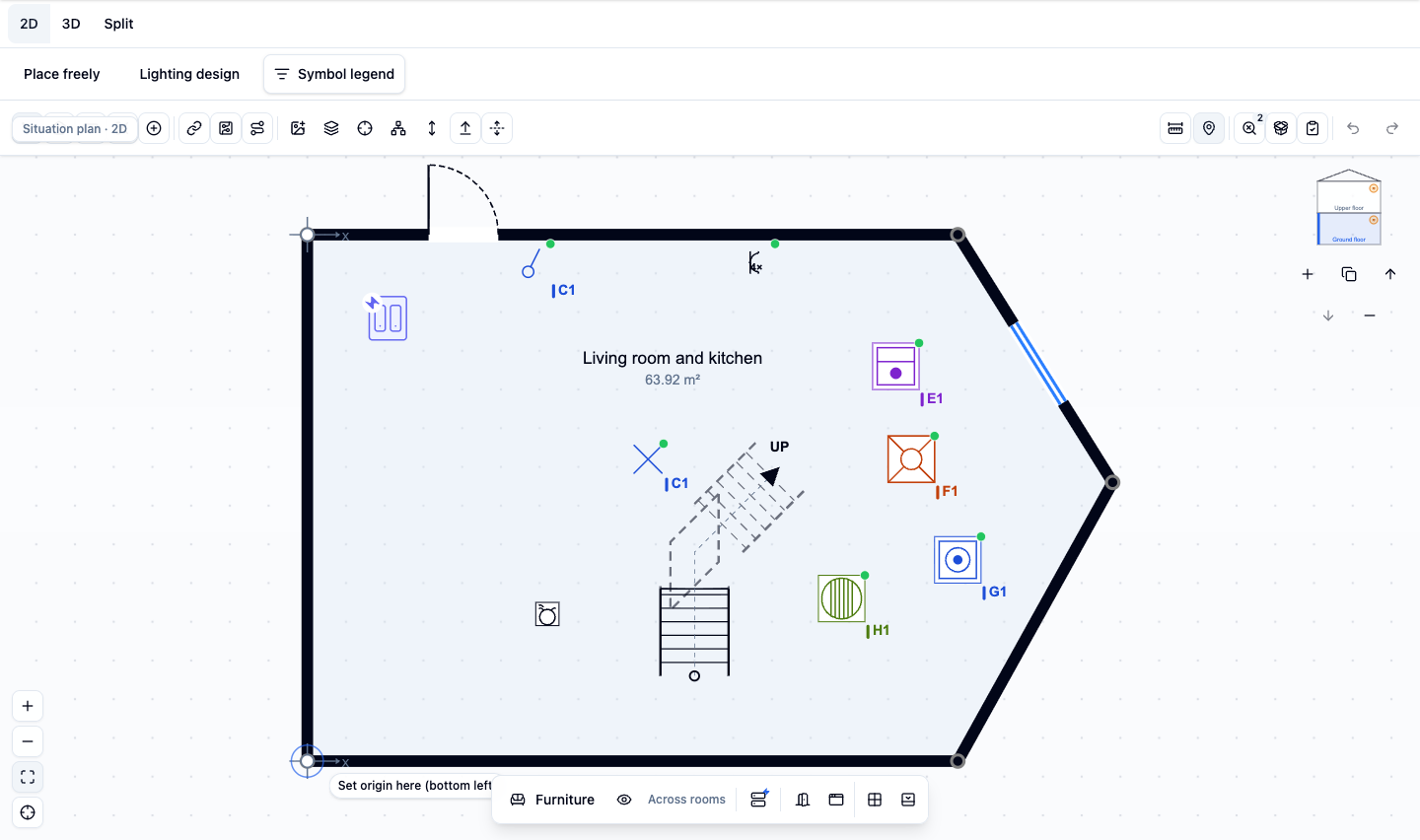
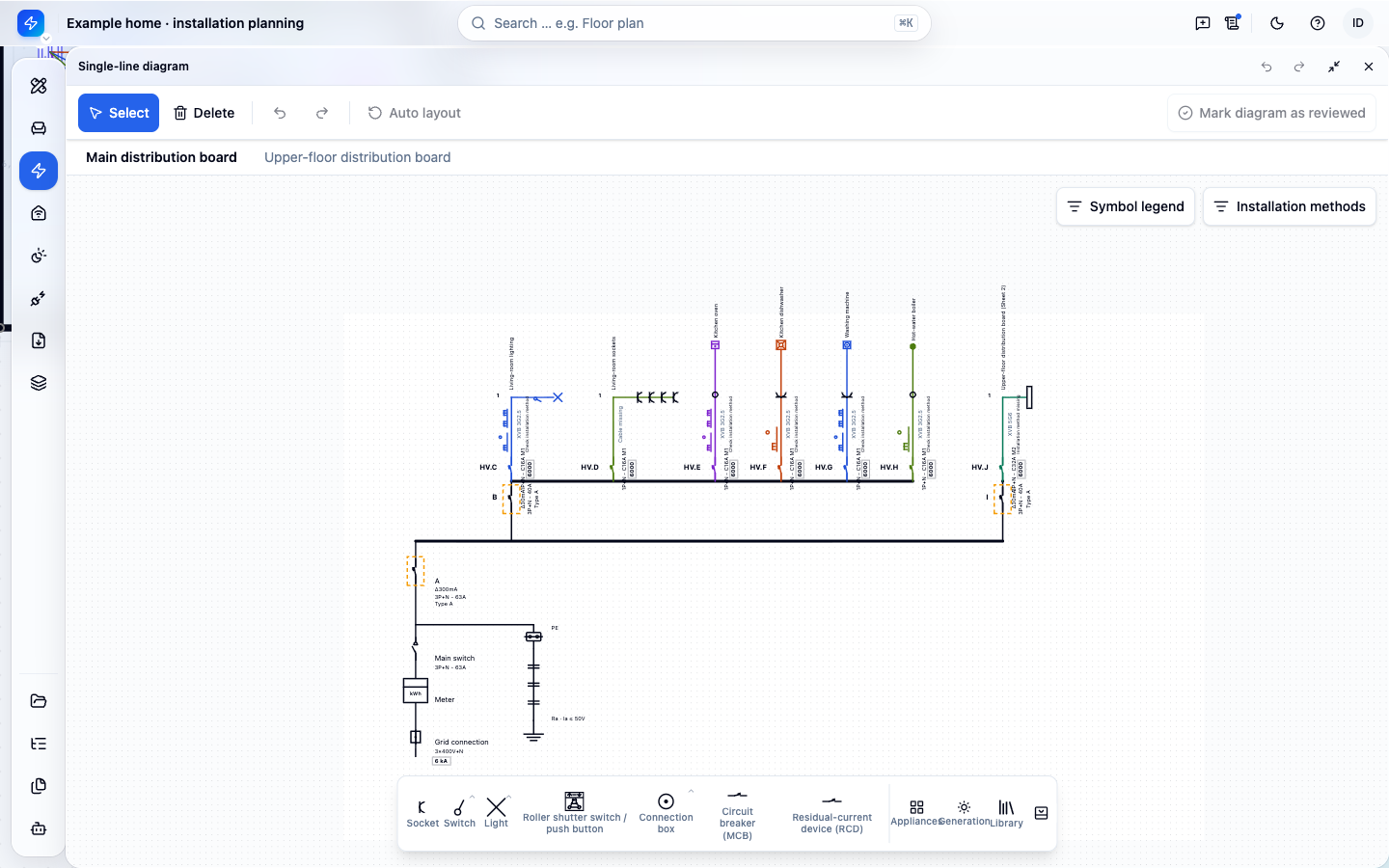
| Reference on the floor plan | Entry in the diagram | Check on site |
|---|---|---|
| E1 | E, point 1: oven | appliance identity and real connection point |
| F1 | F, point 1: dishwasher | connection point and documented assignment |
| G1 | G, point 1: washing machine | appliance and position in the room |
In the example, C1 appears at the switch and at the associated lighting point: both refer to the same switched lighting point. The repeated reference is intentional here, not a duplicate error. Check the switching relationship before renumbering.
If you move a device, check its position and electrical assignment separately. If it changes circuit, update the reference in both documents. After additions, a second person traces floor plan, diagram and board labels by sampling.
Step 5: Legend and title block
Complete your plan with:
- a legend listing every symbol used and its meaning, especially custom signs;
- a title block with the AREI/RGIE required details: number, revision and revision date (3.1.2), installation address, and the name, capacity and, where applicable, VAT number of the person responsible for the work (3.1.2.1 a); plus the scale and space for signature and endorsement;
- a north arrow (optional but useful);
- storey identification for buildings with several levels; one sheet per storey stays most readable.
Common mistakes
| Mistake | Consequence | Fix |
|---|---|---|
| treating the smoke-detector duty as an AREI rule | wrong basis for the check | check separately against the current regional source and label it |
| treating an outdoor socket generically | IP rating or protection does not suit the external influences | check IP rating and RCD protection for the project |
| missing labels or circuit numbers | points cannot be linked to the diagram | mark every point with letter and number |
| unexplained symbols | does not meet 3.1.2.1 a | use Table 2.23; choose unambiguous custom signs and explain them in the legend |
| switch on the wrong side of the door | impractical (not an AREI breach) | check the opening direction |
| bathroom socket drawn in the wrong zone | plan and installation lead to a safety-relevant finding | check zones and protection against Chapter 7.1 |
| no legend | custom signs cannot be read | add a symbol table |
Checklist before the inspection
- All rooms labelled
- All boards, boxes, sockets, switches, lighting points, fixed appliances and sources drawn
- Smoke detectors, if shown, checked separately and labelled
- Outdoor sockets recorded with project-specific IP rating and protection
- Circuit letter and number at every point
- References match the single-line diagram
- Table 2.23 symbols, custom signs in the legend
- Title block with number, revision, date, address and responsible person
- One sheet per storey
Site check: does the plan match the building?
Once drawn, walk through the building with the plan. Start at the board and follow every circuit. Check not only that a socket exists, but that multiple socket, switched socket, junction box, fixed connection and lighting point are correctly distinguished. For switches, the reference must show which lighting point or appliance they control. Devices behind built-in furniture, outdoor elements, plant rooms and outbuildings are easily missed.
Then compare with the single-line diagram. An item referenced A3 on the situation plan appears there as the same item in circuit A. Contradictory assignments and devices moved after the fact are the most common causes of contradictory documents. For several storeys or building parts, a clear sheet structure helps; number, revision and revision date appear on every issued plan.
The situation plan shows the real state, not just the original intent. Mark a change as complete only once cable route and device position have been checked on site. For a non-substantial change, a short description is enough for the single-line diagram; you still draw the change on the situation plan (3.1.2.1 a). For substantial modifications or extensions, you create or update the single-line diagram and situation plan, and the affected work is inspected before it is put into use.
What the plan does not decide
A symbol proves neither mounting height, IP rating, bathroom zone, earthing quality nor disconnection time. You establish those properties with on-site checks, measurements and manufacturer documentation. Smoke-detector duties come from regional building and housing law; the plan may show detectors, but the electrical inspection and regional requirements remain separate questions.
PlanElec keeps device position and electrical assignment together in one project model. Items not yet placed, not assigned to a circuit or imported only as a reference stay visibly open. The advisory self-check shows you errors in the supported rules; the official assessment is made by the approved control body.
Prepare readability for the inspection
Export the plan once at the intended sheet size. Symbols, references and room boundaries stay distinguishable without heavy zooming. Offset overlapping references and connect them with a clear leader line. Colour helps while editing but never carries meaning on its own, because printouts are often black and white.
Keep a list of open items for inaccessible boxes, unknown switching relationships or assumed cable routes. You resolve those before the final revision or mark them visibly as unknown. A clearly marked data gap is more honest than a symbol at an estimated position. Finally, have a second person trace references between situation plan, single-line diagram and board labels by sampling.
Official source
- FPS Economy: RGIE/AREI Book 1, current official publication
- Decisive are Book 1 V06, Chapter 2.12 (definition of a plan), Section 3.1.2 (content and referencing), Table 2.23 (symbols) and Chapter 7.1 (rooms with a bath or shower).
Related articles
- Creating a single-line diagram: step by step
- Single-line diagram vs situation plan
- Electrical inspection in Belgium
- Distribution board planning: structure and sizing
With PlanElec, you draw your situation plan directly on the floor plan: create rooms, place devices from the symbol catalogue, assign them to circuits and export the situation plan together with the single-line diagram as PDF. Start free →
From the guide to your own electrical plan
Create a project and document circuits, cables and protective devices. Check the result against the actual installation.
Fictitious sample dossier, available without sign-up.