Free · no accountsketch.planelec.be

PlanElec Sketch

The single-line diagram in your browser. Free, no account.

Draw the circuits, boards and situation plan of your installation and download everything as a PDF. When the project grows, take the drawing to PlanElec Pro in one click.

Who it is for
Installers with one-off diagrams, anyone switching from Trikker, homeowners.
Price
€0, no sign-upNo payment details. The PDF carries no watermark; the free PDF carries the line “Drawn with PlanElec Sketch”.
How it works
In your browser, nothing to install. Interface in Dutch, French, German or English; you choose the document language separately.
Output
PDF in A4 or A3, landscape or portrait, plus SVG and the material list as CSV.
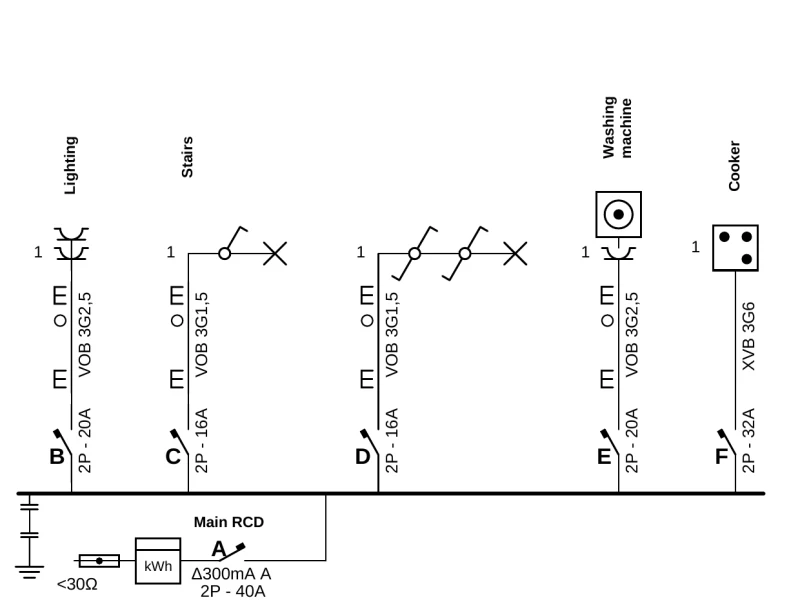
Example single-line diagram drawn in PlanElec Sketch: five circuits on the busbar below the main RCD

What Sketch does today

Everything you need for a complete single-line diagram with situation plan, right in your browser.

  • Draw the single-line diagram

    Place supply, meter, circuit breakers, RCD groups, loads and cables at the insertion points. Sketch assigns the circuit letters in sequence.

  • Find symbols fast

    Sockets, switches, lights, push buttons, controls, appliances, doorbell and energy, with search and favourites. Copied circuits wait on the clipboard.

  • Boards and sub-boards

    Show a sub-board inside the diagram or on its own page. Page references in the PDF show where it continues.

  • Start from a template

    Begin with a house, a flat or a blank drawing and add a charging point in one click.

  • Situation plan with floors

    Put the devices from the diagram on the plan, draw walls, doors, windows and rooms, or place a plan image or PDF underneath and calibrate it.

  • Cover page and title block

    Enter customer, installation address, EAN code, installer with logo and inspection body. You choose the document language independently of the interface.

  • PDF in A4 or A3

    Landscape or portrait, with cover page, circuit list, material list and legend. The material list counts the devices; cables are listed without a length. Sketch spreads large floors across several sheets at plan scale.

  • Open Trikker files

    Open your .trik files directly in Sketch. A report shows which spots to check after the import.

  • Save with or without an account

    Without an account the drawing stays in your browser and with you as a file. With your PlanElec account it is ready on every device; when it is saved there unchanged, the PDF carries a “Verify document” QR code.

Who Sketch is for

  • Installers with a single diagram

    For a small job or an existing installation: draw the diagram, hand it over as a PDF, done.

  • Switching from Trikker

    Open your .trik files and keep drawing in Sketch, in your browser with nothing to install.

  • Homeowners and self-builders

    Draw the diagram of your own installation and go through it with your electrician before building or inspection.

Start with Sketch, continue in Pro

Sketch does not lock you in. What you draw there becomes a Pro project in one click: single-line diagram, boards, circuits, cables and project details. You recreate the situation plan in Pro on the floor plan.

Before Pro creates the project, the takeover page lists everything that is not taken over.

  1. Draw the single-line diagram in Sketch for free
  2. Click “Take it to Pro”
  3. Continue in Pro with floor plan, board and dossier

More than one diagram?

PlanElec Pro plans the whole project: floor plan, circuits, distribution board, AREI/RGIE self-check and dossier in one model.

All about Pro

Frequently asked questions

Is PlanElec Sketch really free?

Yes. Drawing, saving and PDF export cost nothing, with no sign-up and no payment details. The PDF carries no watermark; the free PDF carries the line “Drawn with PlanElec Sketch”.

Where is my drawing saved?

Without an account Sketch saves every change in your browser, and you can download the drawing as a file at any time. With your PlanElec account Sketch saves it to the account and it is available on every device, up to 1,000 drawings and 200 MiB per account.

Can I continue in PlanElec Pro later?

Yes. “Take it to Pro” turns your drawing into a Pro project: single-line diagram, boards, circuits, cables and project details. The situation plan stays in Sketch; the takeover page shows you beforehand everything that is not taken over.

Who inspects my installation?

The inspection (keuring) is carried out by an approved inspection body. Sketch gives you the single-line diagram and situation plan for it; as a homeowner you go through both with a qualified electrician before the work starts.

Draw your single-line diagram

Open Sketch and start. No account, nothing to install, no payment details.

Start drawing for free sketch.planelec.be