For companies

PlanElec Pro

The whole project in one model, from floor plan to dossier.

Capture the installation once. Circuits, distribution board, single-line diagram and situation plan come from the same model, and the AREI/RGIE self-check (the Belgian wiring regulations) follows every change. You draw, dictate or ask the AI assistant.

Who it is for
Installers, engineering offices and architects with whole projects.
Price
From the start of the plans: €12 per property or €24 per monthWith “Try Pro” you get to know Pro with your own project, no payment details needed. Payment only starts with the paid plans.All prices exclude 21% VAT.Pricing in detail
How it works
In your browser. Projects live in your account; as a team you work in an organisation with roles.
Output
Single-line diagram, situation plan, distribution board and AREI/RGIE self-check report as PDF, bundled in the installation dossier.
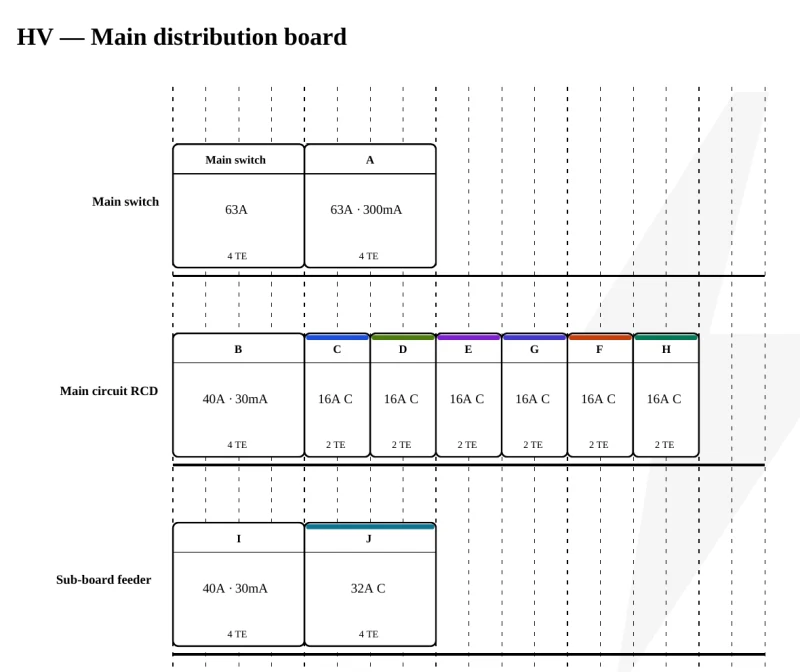
Switchboard layout from a PlanElec Pro example project: main switch, main RCD, circuit breakers and sub-board feeder

What Pro does today

From the AI assistant to teamwork: the feature areas of Pro. Anything still in pilot is marked.

Pro in detail

Eight functions the overview only touches on: from the distribution board to cables, bus and photovoltaics, through to 3D, energy, furniture and lighting. Every visual shows a real function; the animations are schematic and carry no project values.

  1. Fit and wire the distribution board

    Fill the DIN rails automatically by residual-current-device group or place every module yourself. PlanElec estimates the space needed with reserve, suggests matching enclosures, creates sub-boards with their feed and shows the wiring with terminal blocks and N and PE bars. Photos of a board turn into a verifiable fitting proposal.

    Guide in the help centre
    Installation headCircuitsSub-boardQ63 AA300 mAB30 mAC16 AD16 AE16 AF20 AG16 AH16 AI30 mAJ32 AK20 AFilled automatically, reserve checked
    Schematic animation, no project values
  2. Cable routes, lengths and voltage drop

    Cables automatically follow the drawn walls, ceiling lights the ceiling plane; you correct the run with waypoints, and floor changes go via a staircase or shaft. PlanElec carries the length of every cable into the cable and material lists and checks the voltage drop against the limits for lighting and the other circuits.

    Guide in the help centre
    Main14.8 m7.2 mRoute along the walls · length in cable list and voltage drop
    Schematic animation, no project values
  3. Bus lines and home automation

    With an active automation profile (KNX, Niko Home Control, Loxone, Shelly, Sonoff or vendor-neutral) you place control points on the floor plan, assign actuator channels to loads and document bus lines with power supply and bus-current budget. “Lay bus” proposes the bus cable along the walls; channel plan and terminal plan export separately or in the handover dossier. Group addresses and programming stay in the manufacturer’s software.

    Guide in the help centre
    Power supplyActuator · 4 channels1234Control pointsBus line
    Schematic animation, no project values
  4. Photovoltaics from roof to inverter

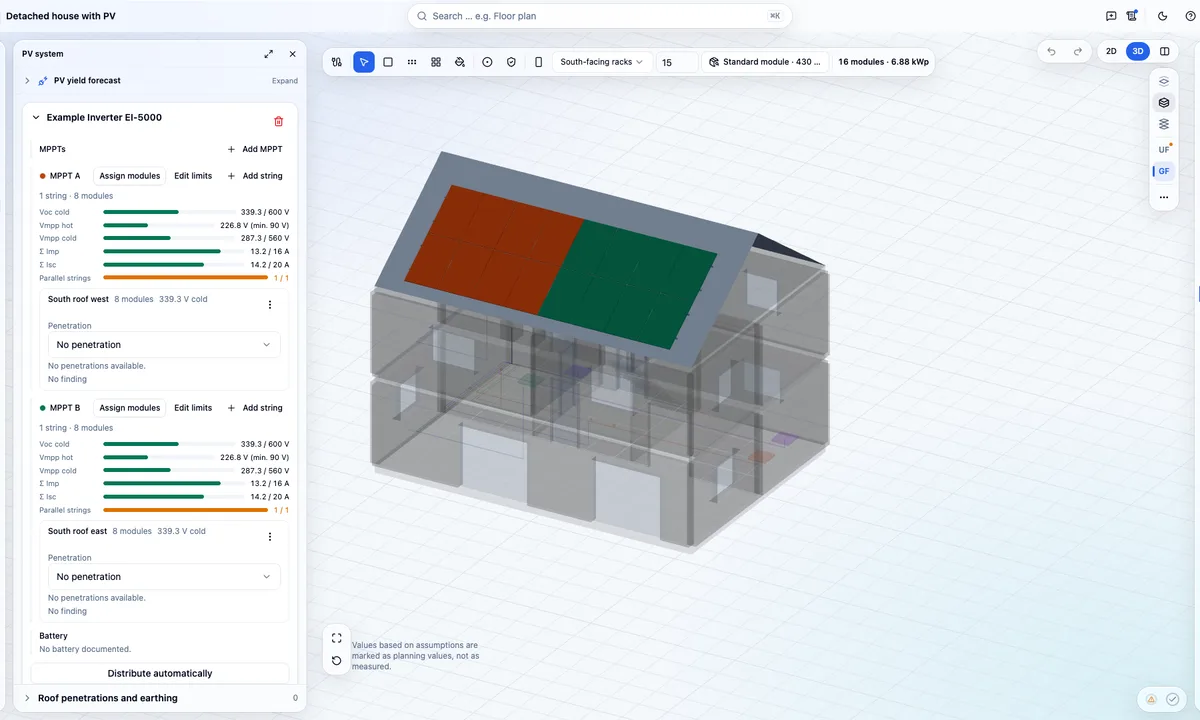
    Choose the roof shape, from flat to gable, hip and mono-pitch, and fill the roof faces in 3D with single modules, rows, fields or whole faces. Assign strings to the MPPT inputs with live checks of voltage and current, pick the inverter from the verified catalogue or the Synergrid C10/26 list and derive DC lengths via roof penetration and earthing point. The yield forecast calculates with PVGIS per orientation.

    Guide in the help centre
    Roof faceString 1 → MPPT AInverter
    Schematic animation, no project values
  5. 3D view of the whole project

    The 3D view shows the same state as the floor plan: floors, walls, openings, stairs, furniture, devices and cable routes. You move walls, openings and devices directly in 3D, edit cables with points and heights, stack or explode floors and work with 2D and 3D side by side on wide screens. Without WebGL everything stays usable in 2D.

    Guide in the help centre
    3D view in PlanElec Pro: transparent building model with two floors and a module-covered gable roof, next to the PV system panel with strings per MPPT.
    Product view from a fictional sample project
  6. Self-consumption, battery and electric car

    Estimates self-consumption and self-sufficiency per month and year from a standard profile of Flemish households and the PV generation of a typical year. Shows how a home battery in the model affects self-consumption and grid draw; the size suggestion rests on an assumed threshold. Takes one or two electric cars into account with flagged assumptions. No tariffs, no savings, no report.

    Guide in the help centre
    06121824Time of dayPV generationHousehold profileSelf-consumption
    Schematic animation, no project values
  7. Furniture and interior

    Furnish rooms from a catalogue of living, dining, bedroom and kitchen furniture plus outdoor objects so sockets, switches and lights fit the later use. You set dimensions in centimetres; kitchen units follow common widths. Furniture appears in 2D and 3D and can be shown or hidden on the situation plan.

    Guide in the help centre
    Devices follow the use
    Schematic animation, no project values
  8. Lighting planning and lighting study

    Place luminaires individually or as a spot grid and manage luminous flux, colour temperature, beam angle and mounting height per room. The light preview in 3D shows scenes such as everyday and evening with light cones and shadows; the daylight study sets sun position and shadows for Brussels. The heatmap on the floor plan gives indicative values of direct illuminance: a planning aid, not a standards-based lighting calculation.

    Guide in the help centre
    Heatmap · indicative values
    Schematic animation, no project values

Who Pro is for

Start with Sketch, continue in Pro

Sketch does not lock you in. What you draw there becomes a Pro project in one click: single-line diagram, boards, circuits, cables and project details. You recreate the situation plan in Pro on the floor plan.

Before Pro creates the project, the takeover page lists everything that is not taken over.

Take over a Sketch drawing
  1. Draw the single-line diagram in Sketch for free
  2. Click “Take it to Pro”
  3. Continue in Pro with floor plan, board and dossier

Just a single-line diagram?

PlanElec Sketch draws it for free in your browser, no account needed. Take the drawing to Pro later in one click.

All about Sketch

Frequently asked questions

What does PlanElec Pro cost?

From the start of the paid plans, Pro costs €24 per month, 3 seats included; the price stays for as long as your subscription runs without a break. A single property costs €12, once. With “Try Pro” you get to know Pro with your own project, no payment details needed. All prices exclude VAT; the details are on the pricing page.

I already have a drawing in Sketch. Do I have to start over?

No. Click “Take it to Pro” in Sketch or load the Sketch file on the takeover page. Pro takes over the single-line diagram, boards, circuits, cables and project details and shows you beforehand what is not taken over.

Which documents does Pro produce?

Single-line diagram, situation plan, distribution board and the AREI/RGIE self-check report as PDF, with your installer details and logo. You bundle selected documents in the installation dossier with cover page, table of contents and page numbers.

Who approves the installation?

The inspection (keuring) is carried out by an approved inspection body. The AREI/RGIE self-check in Pro shows you open points and missing details from your project data beforehand, so you go into the inspection prepared.

Plan your next project in Pro

Floor plan, circuits, distribution board and dossier from one model, with AREI/RGIE self-check.